

A lot of work has happened in MAME recently to get emulation closed to PCB behavior, and the new MiSTer CV1000 core seems very promising, so thought it would be good to have some actual benchmark to compare things.
So here we are, DOWNLOAD HERE and read more below.
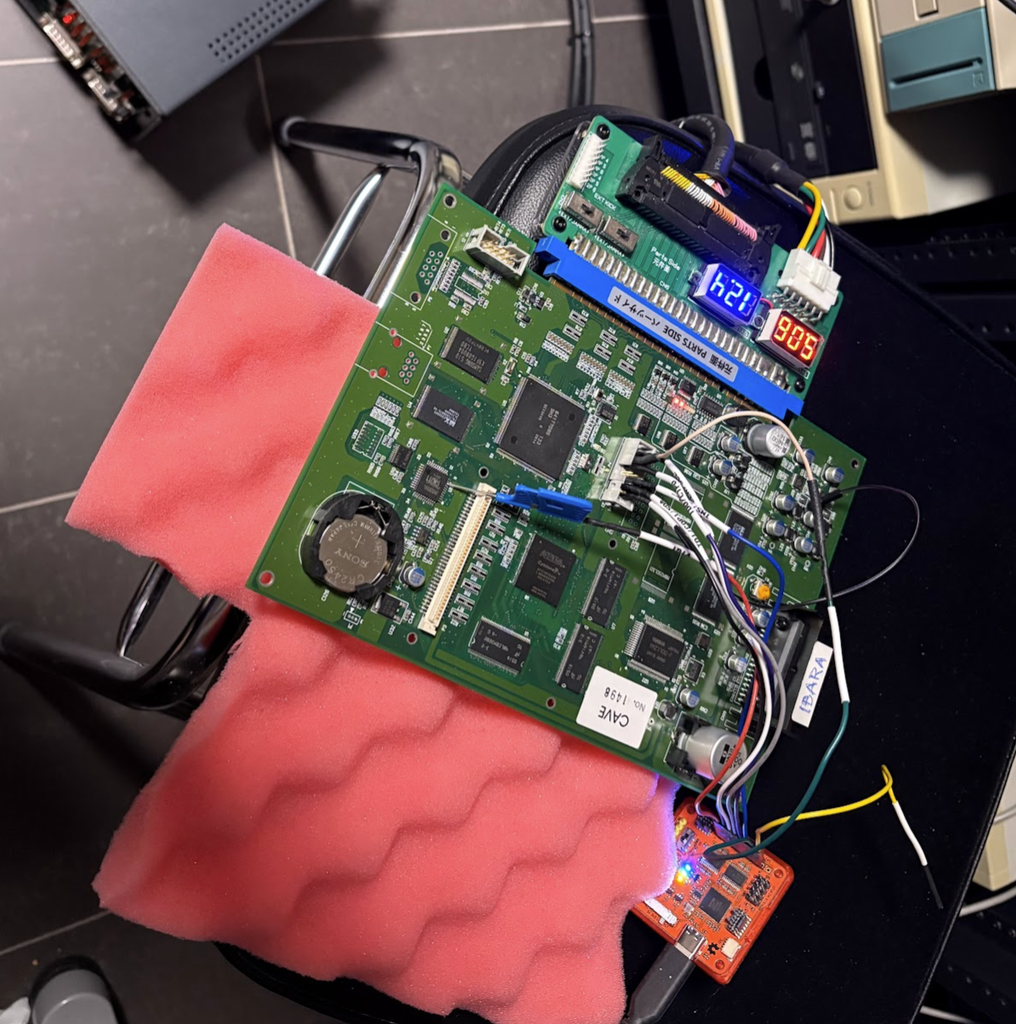
What does the benchmark test?
The Benchmark suite will run a set of tests, which are just meant stress the board until slowdown triggers.
It’s unlikely to be a GOOD replication of what actually happens on boards, but it’s at least a simple means for comparing emulation versus actual hardware.
I’ve aimed to get a good spread of different types of loads, but don’t read too much into it.
Test results
Result screens after running the benchmark:
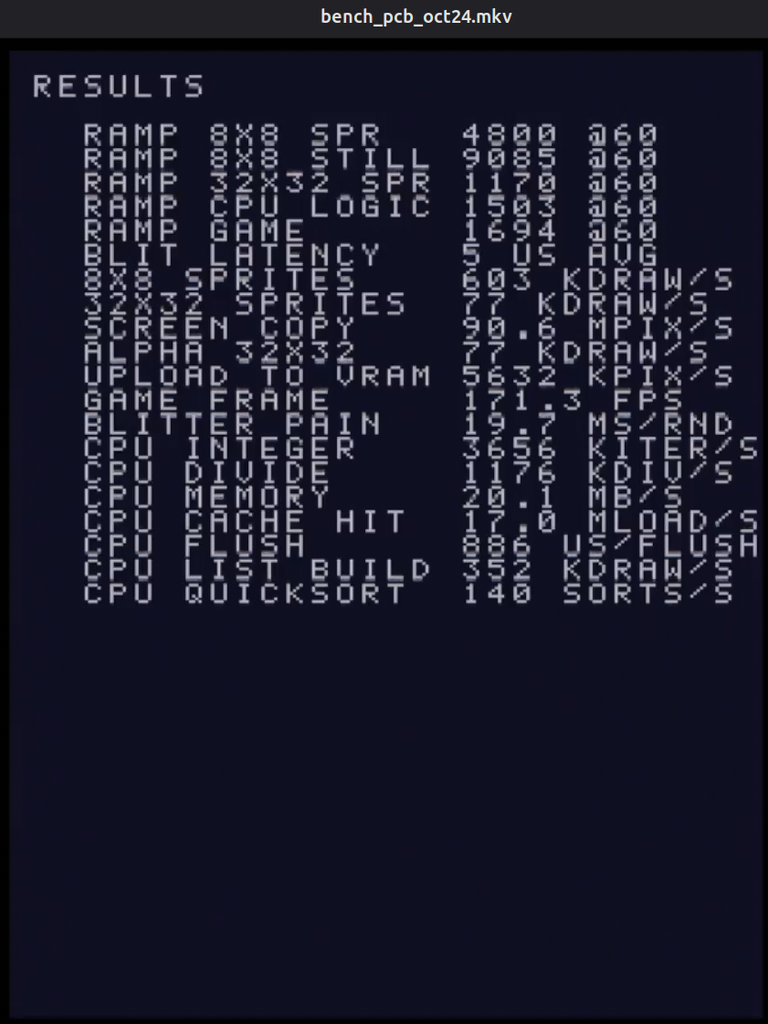
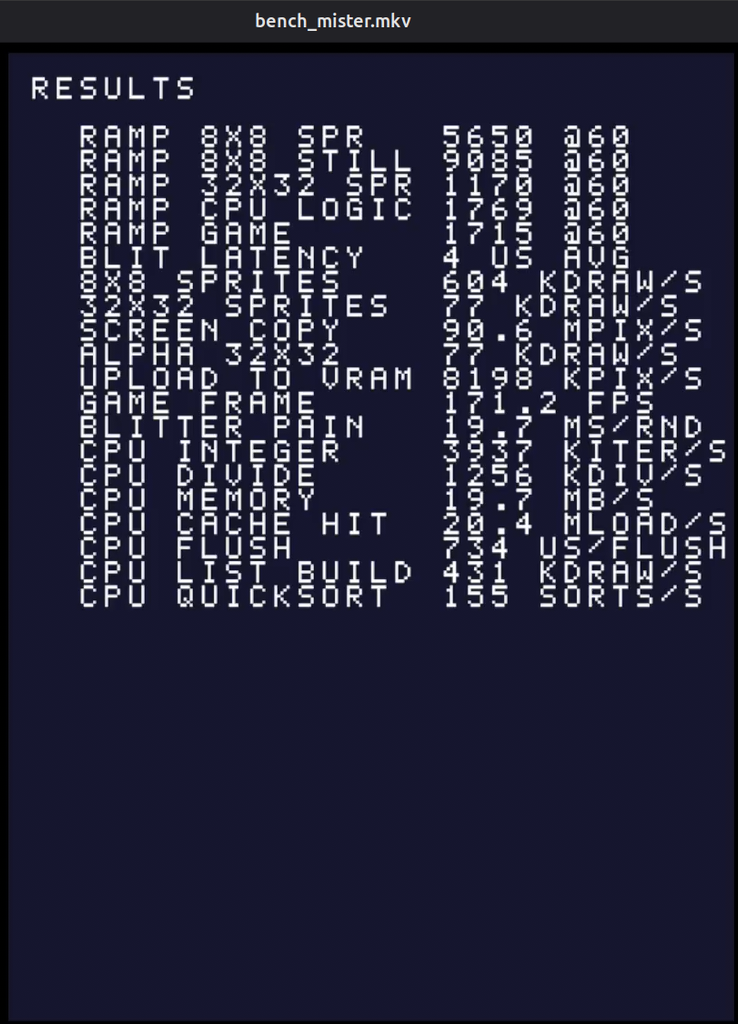
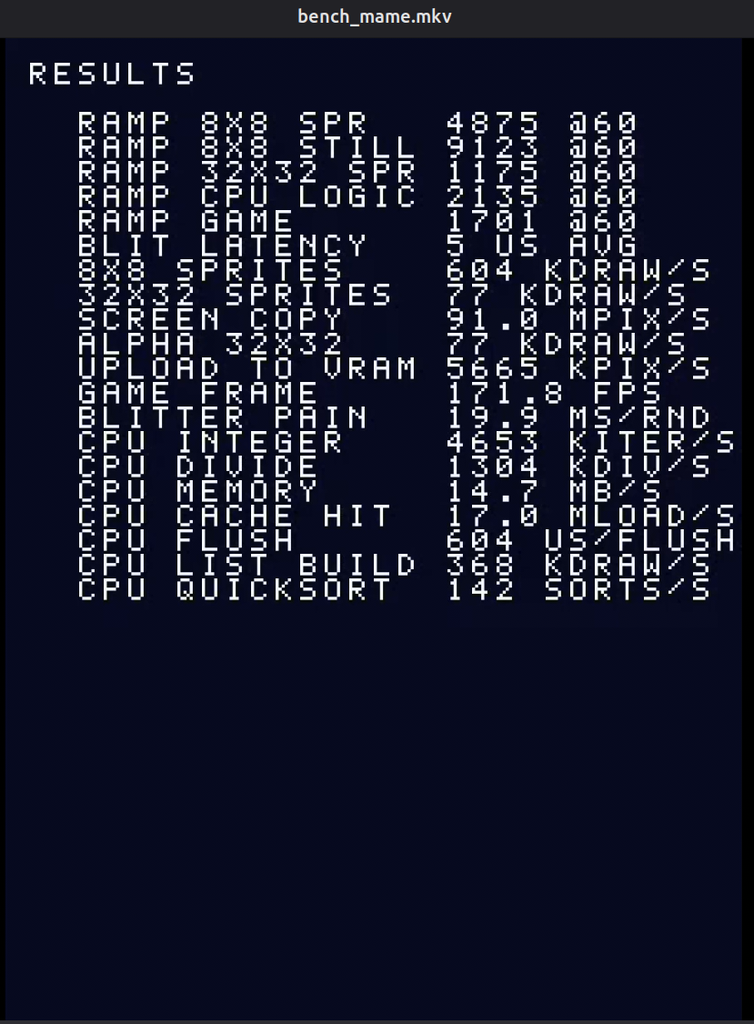
Videos for all runs:
What the tests are
Ramping tests
- RAMP 8X8 SPR
- Up to 30,000 small transparent sprites moved every frame. 8×8 sprite is cheap to draw, so most work lands on the CPU.
- RAMP 8X8 STILL
- Up to 46,000 of the same sprites, not moving and written straight into the command list with five stores each, the way a tile map is drawn. With almost no CPU load, this measures the blitter’s fixed cost per draw command.
- RAMP 32X32 SPR
- Up to 5,000 transparent 32×32 sprites. Each is 16 times the pixels of an 8×8, so the blitter’s pixel throughput is the limit rather than its per-command overhead.
- RAMP CPU LOGIC
- Up to 11,000 objects, each run through forty rounds of a multiply-shift-xor hash before it is drawn as an 8×8 sprite. Drawing is trivial here, so this is another CPU focused test.
- RAMP GAME
- The closest something resembling a real game frame: a 1,200-tile background plus up to 8,200 objects with light logic, alternating 32×32 sprites and half-transparent 16×16 ones. CPU and blitter are both busy, and the test shows which one gives out first.
Blitter throughput tests
- BLIT LATENCY
- A list with a single 8×8 draw, started and waited for over and over. It measures the fixed cost of starting a blit, and how long the blitter takes to report busy. Every other blitter figure includes this overhead.
- 8X8 SPRITES
- 1,000 transparent 8×8 draws per list. With so few pixels per draw, the result is close to the blitter’s cost per command.
- 32X32 SPRITES
- 400 transparent 32×32 draws per list: the typical size of a player ship or enemy, where command overhead and pixel work both count.
- SCREEN COPY
- Eight opaque full-screen 320×240 copies per list. No transparency and huge draws, so this is the blitter’s raw fill rate.
- ALPHA 32X32
- 400 cross-faded 32×32 draws. Blending has to read every destination pixel before writing it, so this shows what translucency costs compared with test 08.
- UPLOAD TO VRAM
- 32 uploads of 32×32 pixel data from work RAM into video RAM. The blitter takes over the bus to read work RAM, which stalls the CPU meanwhile. The CPU side and the blit are reported separately.
- GAME FRAME
- A fixed frame of about what a game sends: 1,200 opaque 8×8 tiles, 300 32×32 sprites and 100 cross-faded 16×16 sprites. It reports how many such frames per second the board could draw, both one at a time and pipelined, with the next list built while the blitter draws the current one.
- BLITTER PAIN
- The heaviest test. Two 224×224 sprites are uploaded, then drawn eight times each in three ways: plain, cross-faded, and flipped with a colour tint. Each of the four stages is its own timed list. That separates upload, raw fill, blending and the tint and flip paths, so a board and an emulator can be compared stage by stage.
CPU tests
- CPU INTEGER
- A 20-instruction loop of multiply, shift, xor and add, all in registers, the kind of code inside a random number generator or hash.
- CPU DIVIDE
- 32-bit unsigned division. The SH-3 has no divide instruction, so the compiler calls a library routine built from one-bit divide steps.
- CPU MEMORY
- A 128 KB copy with 32-bit words, byte-at-a-time memcpy, and a 32-bit fill. The data is eight times the size of the 16 KB cache, so this measures cache misses, write-backs and the SDRAM behind them.
- CPU CACHE HIT
- Loads that follow a random chain through 8 KB, which fits entirely in the cache. Each load needs the previous one’s result, so the CPU waits on every load. This measures cache hit latency without RAM getting involved.
- CPU FLUSH
- Cache flush routine, which games run before the blitter reads new data from RAM. It clears all 1,024 cache entries from uncached memory, then invalidates the cache. It is timed once with every line dirty and once with none, and the difference gives the cost of writing one cache line back to RAM.
- CPU LIST BUILD
- Writing sprite commands into the blitter’s command list, which is never sent. This is the CPU’s share of drawing a sprite: a handful of writes to uncached RAM, which the blitter reads directly.
- CPU QUICKSORT
- Sorting 4,096 32-bit integers, checked after every sort. Branchy, general-purpose code with plenty of loads and stores, closer to typical game logic than the tight loops above.
What does this mean then?
The TL;DR is that both are pretty good! Some take-aways from the tests:
- Blitter latency is VERY accurate on both. Mister is a perfect match (which is sortof expected given its based on a reverse engineered bitstream), while MAME is within 1% or so of the Blitter induced slowdown.
- The MiSTer core runs the CPU bound Ramp tests about 18% too fast consistently (RAMP 8X8 SPR and RAMP CPU LOGIC tests).
- MAME runs the “RAMP CPU LOGIC” test weirdly performant compared to PCB (+42% performance) while the “RAMP 8X8 SPR” test is extremely close to PCB behavior. This is kinda interesting since it’s a fairly different spread compared to how MiSTer behaves.
- The ONLY test where either MAME of MiSTer behaves significantly slower than PCB is the “CPU MEMORY” test, where MAME is about 27% slower than both PCB and MiSTer, which probably means there’s a bug there somewhere.
- If the tests meant to somewhat look like actual game frames (RAMP GAME and GAME FRAME) are to be trusted, both MAME and MiSTer are super close to board slowdown behaviors for load in the most common scenarios!
Basically, unsurprisingly no emulation currently behaves “Exactly like on PCB”, but both are getting closer!