
For quite a while now, I’ve known that converting Ibara PCB’s to Ibara Black Label without any soldering is possible with a minor audible difference. The character select music from Ibara Kuro is not present on the regular Ibara roms, which is not solvable without re-soldering.
Other than that, the music roms are identical, and since both the U2 and U4 roms can be reprogrammed through JTAG, that means that a conversion between them is possible, although it will be be noticable on the character select screen.
This post covers that a bit more in-depth.
Difference in music ROMs
If running the Audio_ExtractData scripts in my cv1k research repo on the Ibara and Ibara Black Label romset and then comparing checksums, it becomes clear that every entry in the list of sounds match except the first two.
On the regular Ibara sound ROMs, this seems to be some unused placeholder music from Mushihimesama. If inspecting the name for these in the program data, there’s some strings such as “GOMEN (old)”, which can also be checked in the test menu through memory hacking. Playing these will play some of the Mushihimesama music.
The track at ID=0 is just about a second, but the one at ID=1 is about 28 seconds long.
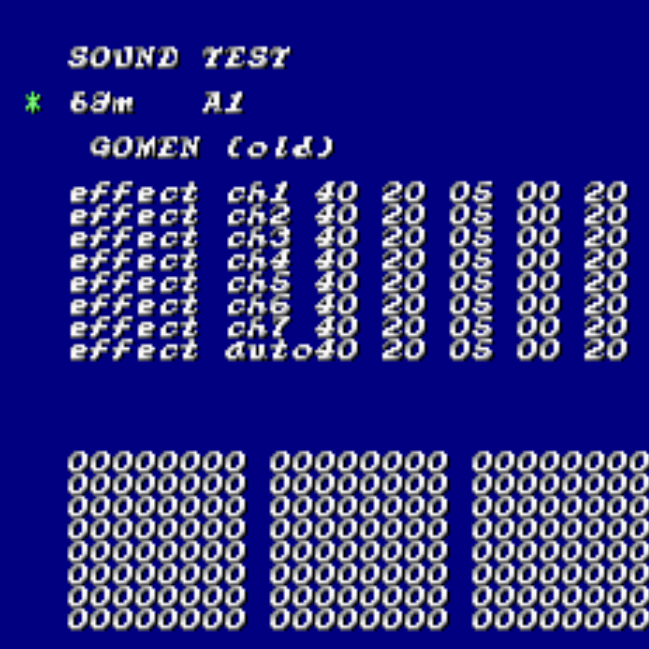
If inspecting the music in the first two slots of Ibara Kuro, then one can notice that the first one holds the new Character Select music, which is the only new tune (about 47 seconds long).
This means that simply swapping the non-music roms on the board would have the character select music play a second of Mushihimesama music, and then silence… which isn’t the end of the world, but we can improve that slightly!
Modifying the Ibara Kuro U4 rom to play nice with character select music
The simplest thing to do here is to swap the track played on character select screen. After reverse engineering the program code, the TL;DR is that this is controlled by the byte at offset 0xC186F of the Ibara Kuro U4.
By default it’s set to 0x00 which would play a second of Mushihimesama music. Changing it to 0x01 will have it play the longer Mushi tune, which I felt was sufficient. Changing it to 0x10 will have it play “Showtime” which was the original Stage 1 music that was not used in Ibara Kuro for some reason, so that’s also a good option.
TL;DR: Change the byte at 0xC186F from 0x00 to 0x01.
Writing ROMs through JTAG
The TL;DR here is really just to follow the instructions on https://github.com/buffis/cv1k_research/tree/main/JTAG (and especially https://github.com/buffis/cv1k_research/blob/main/JTAG/urjtag_setup.md )
Commands below assumes having checked out that repo and using a UsbBlaster, but if you go the Tigard route, it will be a lot faster.
Either way, it will take a long time (24h or so for Tigard, several days for UsbBlaster), so make sure to have a good space to do it!

Writing U4
First be nice and dump your own U4 and verify it’s not a undumped revision.
sudo jtag
jtag> cable UsbBlaster
jtag> detect
jtag> detectflash 0
jtag> readmem 0 0x200000 u4.bin
Then with the U4 modified for the character select screen:
# This will take a few hours with UsbBlaster, and less than
# an hour with Tigard
sudo jtag
jtag> cable UsbBlaster
jtag> detect
jtag> detectflash 0
jtag> flashmem 0 u4.bin
Writing U2
It’s VERY VERY IMPORTANT to make a backup of the initial block of your PCB first. CV1000 programs around initial bad blocks of the NAND, and if you lose your bad block table, than that can lead to bad behavior later.
# Store this somewhere safe
sudo python3 K9F1G08U0M_JTAG.py read_page --page=0 --filename=u2_page0.dump

# Then run this to print the bad blocks
sudo python3 K9F1G08U0M_JTAG.py bad_blocks
You will then need to align the Ibara Kuro U2 rom to the bad blocks, using: https://github.com/buffis/cv1k_research/blob/main/U2_Tool/u2tool.py
As an example, if blocks 78 and 201 are bad, run:
python3 u2tool.py adjust ibarablk.u2 --outfile=ibarablk_fixed.u2 --bad_blocks=78,201
You can then follow the instructions of https://github.com/buffis/cv1k_research/tree/main/JTAG#write-u2 to write this to the board. With a UsbBlaster, this can take 70+ hours. With a Tigard, I think it’s closer to 24 hours, so still a while.
Should you do this?
Honestly, probably not. The base game plays better, and Black Label feels a bit like a weird romhack. Unless you are confident messing around with expensive hardware, I’d avoid doing it. The setup is somewhat complex.
If you however end up doing it, make extra sure to backup your bad block table and don’t complain to me if you break something.
But yeah, if you have several Ibara boards and you know what you are doing, then this can be fun to do on one of them since you can always reverse it later 🙂
